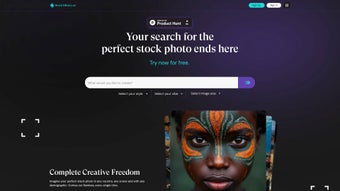

Download StockLibrary – AI‑Powered Stock Photo Generation for Asian Markets
Overview
StockLibrary is a cloud‑native, AI‑driven platform that creates ultra‑realistic stock photographs specifically tuned for the diverse visual language of Asian markets. Unlike traditional stock libraries that rely on generic, often Western‑centric imagery, StockLibrary’s generation engine has been trained on millions of regionally sourced photographs, ensuring that every output respects cultural nuances, ethnic diversity, and local aesthetic trends. Whether you are a marketer needing a polished portrait of a Korean tech executive, a content creator searching for a bustling night market scene in Bangkok, or a product designer looking for a minimalist Japanese‑inspired tabletop shot, StockLibrary can synthesize high‑resolution images in seconds.
The service operates on a flexible credit‑based model: each downloaded image consumes one credit, and users can select from monthly or annual subscription tiers that scale from freelancers to enterprise teams. New users receive a bundle of free trial credits, allowing them to explore the platform without any upfront payment. A unique feature called the Brand Profile lets businesses upload brand guidelines—colors, typography, logo placement, and mood boards—so every generated image automatically aligns with the company’s visual identity.
By merging cutting‑edge AI creativity with a deep understanding of Asian visual culture, StockLibrary becomes an indispensable tool for designers, advertisers, e‑commerce managers, and anyone seeking culturally resonant imagery that stands out in a crowded digital landscape. The platform also guarantees royalty‑free commercial usage, meaning once an image is downloaded, it can be used across advertising, websites, social media, and print without additional licensing fees, streamlining the workflow from concept to final publication.
Key Features, Benefits, and Drawbacks
Feature List
- AI‑driven image generation optimized for Asian ethnicities, architecture, and fashion.
- Multiple photographic styles: cinematic, minimalist, editorial, lifestyle, product, and more.
- Dynamic mood selectors with preset and custom mood blending options.
- Brand Profile integration that automatically applies brand colors, logos, and typography.
- Credit‑based subscription offering both pay‑as‑you‑go and unlimited plans.
- Free trial credits for first‑time users to test the platform risk‑free.
- High‑resolution exports up to 8K with transparent background support.
- Smart searchable library for quick inspiration and reuse of past prompts.
- Secure cloud storage for saved projects, brand profiles, and download history.
- Continuous AI model updates that incorporate the latest fashion, architecture, and cultural trends across Asia.
Pros and Cons
Pros
- Authentic representation of Asian cultures reduces the risk of generic or mis‑cast imagery.
- Instant image generation saves hours compared to manual photo shoots or traditional stock searches.
- Highly customizable style, mood, and brand controls give creators full creative freedom.
- Brand Profile ensures visual consistency across multiple campaigns and assets.
- Scalable credit system works for occasional freelancers and large creative teams alike.
- Free trial credits lower the barrier to entry and encourage experimentation.
- Regular AI updates keep the image library fresh, relevant, and aligned with current trends.
- Royalty‑free commercial license eliminates additional licensing costs.
Cons
- Web‑only service requires a stable internet connection; offline generation is not possible.
- Initial learning curve for the mood‑style matrix may be steep for users without design experience.
- Higher‑resolution downloads consume more credits, which can increase costs for heavy users.
- Subscription pricing is listed in USD, which may be less convenient for some Asian markets.
- Creating detailed Brand Profiles can be time‑consuming, especially for complex brand guidelines.
- Credits are deducted per download, so batch exporting large numbers of images requires careful budgeting.
Getting Started – Installation, Usage, Compatibility & Frequently Asked Questions
Installation & Account Setup
StockLibrary is a fully cloud‑based web application, which means there is no traditional software to download or install. To begin, navigate to stocklibrary.ai and click the “Sign Up” button. The registration form requests basic details—name, email address, and a secure password. After submitting the form, you will receive an email verification link; once verified, an onboarding email arrives with a button to claim your free trial credits. The dashboard is intuitive: a left‑hand navigation pane provides quick access to “Generate,” “Brand Profiles,” “Credits,” and “Settings.” No additional plugins or browser extensions are required.
How to Generate an Image
- Select a Style: Choose a visual style from the dropdown menu (e.g., cinematic, minimalist, editorial).
- Pick a Mood: Adjust the mood slider to set the emotional tone—playful, professional, serene, vibrant, or a custom blend.
- Define the Scene: Enter a concise prompt describing the desired composition (e.g., “young Vietnamese entrepreneur working on a laptop in a modern co‑working space”).
- Apply Brand Profile (Optional): If you have saved brand guidelines, toggle the Brand Profile switch to automatically enforce brand colors, logo placement, and typography.
- Generate & Review: Click “Generate.” The AI returns three variations within seconds. Use the “Edit” tool to fine‑tune lighting, background, or pose as needed.
- Download: Once satisfied, click “Download.” One credit is deducted per image, and you can select the resolution (standard, high, ultra‑high). The file is delivered as a PNG or JPEG, ready for immediate use.
System Requirements & Compatibility
Because StockLibrary runs entirely in the browser, it is compatible with any modern operating system that supports HTML5 and JavaScript. Supported platforms include:
- Windows 10/11 – Edge, Chrome, Firefox
- macOS Catalina or later – Safari, Chrome, Firefox
- Linux distributions with recent browsers – Chrome, Firefox
- iOS 13+ – Safari, Chrome
- Android 8.0+ – Chrome, Edge
The responsive UI adapts to desktop, tablet, and mobile screens, allowing creators to generate images on the go. For optimal performance—especially when exporting 8K files—a stable broadband connection (minimum 5 Mbps) and a modern GPU‑enabled browser are recommended.
Frequently Asked Questions
How many free trial credits do I receive?
New users are granted 10 free trial credits after email verification, which can be used to generate and download any style or mood of image.
Can I use the generated images for commercial projects?
Yes. All images created with StockLibrary come with a royalty‑free commercial license, allowing you to use them in advertising, websites, print, and social media without additional fees.
What happens if I run out of credits?
When credits are exhausted, you can purchase additional credits or upgrade to a higher‑tier subscription plan directly from your dashboard. Credits are deducted instantly upon each download.
Is my data and brand profile kept private?
StockLibrary employs end‑to‑end encryption and adheres to GDPR‑compliant data handling practices. Brand profiles and generated images are stored securely and are only accessible by the account owner.
Do I need any special hardware to generate 8K images?
No special hardware is required because the rendering is performed on StockLibrary’s cloud servers. However, a stable broadband connection will ensure faster download times for large files.
Conclusion & Call to Action
StockLibrary fills a distinct gap in the stock‑photo market by delivering AI‑generated imagery that respects Asian cultural specificity while offering the speed and flexibility of modern design tools. Its blend of style, mood, and brand‑profile customization makes it a compelling choice for agencies, e‑commerce brands, and freelance creators who need authentic visuals without the time‑consuming hunt through traditional libraries. Although the credit system may require careful budgeting for power users, the value derived from instantly generated, royalty‑free images often outweighs the cost, especially when factoring in the savings on photoshoots, model fees, and licensing. The platform’s cloud‑only architecture guarantees that you always work with the latest AI models, meaning your visual assets stay fresh and competitive. If you’re ready to streamline your visual workflow, reduce reliance on generic stock libraries, and elevate your brand with culturally resonant photography, click the button below to claim your free trial credits and experience the future of Asian‑focused stock imagery.
Start Free Trial NowOverall Rating: 4.6/5
Pros: Authentic Asian representation, rapid generation, deep brand integration.
Cons: Credit consumption for ultra‑high resolutions, subscription priced in USD.



.png)



